EcoGuide · Smart Thermostats · Updated 2026-10-19 · 1,200 words
Honeywell Thermostat Low Battery Warning: What It Means and How to Fix It
The Short Answer
The warning means what it says: put in fresh batteries now. Honeywell’s FocusPRO 6000 guide says the REPLACE BATTERY warning “flashes about two months before the batteries are depleted”, so you have time, but not a whole season. If the batteries die completely the screen goes blank and, on a battery-only thermostat, so does your heating and cooling.
| What the screen shows | What it means |
|---|---|
| REPLACE BATT / REPLACE BATTERY (flashing) | Batteries are low; replace them now |
| BATT with an alert icon, alert 405 | Low battery. On the T6 Pro the backlight is switched off to save power |
| Alert 407 | Critically low battery; replace immediately |
| Blank screen on a battery model | Batteries are flat, or it has lost its other power source |
Alert numbers are from Honeywell’s T6 Pro and FocusPRO alert lists.
Which Batteries
Most Honeywell Home wall thermostats that take batteries use two AA alkaline cells: the FocusPRO 6000 guide specifies AA alkaline, and the T6 Pro and FocusPRO P200 documents both say to replace the AA batteries. Use fresh alkaline batteries, not ones from a drawer.
Wireless accessories differ. Honeywell’s ElitePRO guide lists two AAA alkaline for the indoor sensor and two AA lithium for the outdoor sensor, with a warning about 60 days before they run out.
We may earn a commission if you buy through these links, at no extra cost to you. Products are chosen on published specifications; we do not test them in-house (how we choose).

Amazon Basics AA Alkaline Batteries (48-Pack)
AA alkaline, the type Honeywell specifies for its battery-powered wall thermostats. Enough for the once-a-year change Honeywell recommends, plus smoke alarms and remotes.
Check price on AmazonHow to Change Them
- FocusPRO 6000 and similar: press and pull the battery holder out of the side of the thermostat, fit fresh AA alkaline batteries, and push the holder back in.
- T4 Pro, T6 Pro and FocusPRO P200: pull the thermostat straight off its wall plate, fit fresh AA batteries as shown inside, then line it up with the wall plate and push until it snaps back on.
- Other models: look for a battery door on the top or side, or a faceplate that pulls off the wall plate. The battery diagram is inside.
You will not lose your settings. Honeywell says all settings other than the clock are “permanently stored in memory, and do not require battery power”; on the FocusPRO 6000 the time and day only need resetting if the new batteries are not in within about two minutes.
When to Replace Them Without a Warning
Honeywell’s FocusPRO 6000 guide recommends changing the batteries once a year, or before leaving home for more than a month. That second point matters in winter: a thermostat that dies while you are away cannot call for heat.
Still Says Low Battery With New Batteries, or the Screen Is Blank?
- Check the batteries are fresh and the right way round. The polarity marks are inside the holder, and batteries that sat in a drawer for years may already be partly drained.
- Use alkaline, not rechargeable. Honeywell’s FocusPRO 6000 guide specifies AA alkaline. Rechargeable NiMH cells run at a lower voltage than alkaline, so swap them for the type Honeywell specifies.
- Seat them firmly. On models with a slide-out holder, push it all the way back in; on wall-plate models, make sure the thermostat has snapped fully onto the plate.
- Check whether it also has a C wire. Many Honeywell thermostats can run from 24 V power with batteries as backup. If yours is wired that way and the screen is blank even with new batteries, the system power is the problem: see smart thermostat black screen.
- Wi-Fi models dropping offline are a different issue: see Honeywell thermostat offline.
- Still stuck: Honeywell’s own Replace Batt article simply says to replace the battery and lists its support line for anything beyond that.
Replacing an Old Thermostat Anyway?
If yours is an older non-Wi-Fi model and you would rather replace it than keep fixing it, these are the two picks from our best smart thermostats under $100 guide. Which one fits depends on whether your wiring has a C (common) wire; here is how to check.
We may earn a commission if you buy through these links, at no extra cost to you. Products are chosen on published specifications; we do not test them in-house (how we choose).
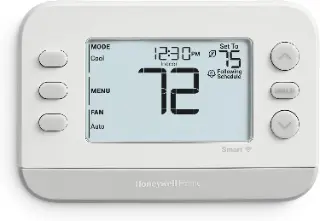
Honeywell Home X2S Smart Thermostat
If you have a C wire: ENERGY STAR certified, works with Apple Home, Google and Alexa through Matter, and supports heat pumps with electric backup.
Check price on Amazon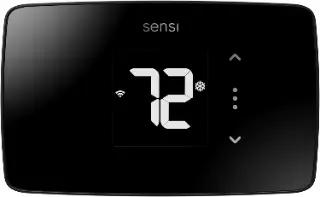
Sensi Lite Smart Thermostat (ST25)
If you have no C wire: Sensi says most systems do not need one. ENERGY STAR certified; works with Alexa and Google Assistant.
Check price on AmazonFree: Home Energy Audit Checklist (PDF)
A two-page, room-by-room checklist for finding air leaks, standby power and heating and cooling waste yourself, in the order that pays back fastest. Get it now, plus new fix guides by email. Unsubscribe any time.
By signing up you agree to receive emails from EcoHome Intelligence. See our Privacy Policy.
Frequently Asked Questions
How long do I have after the low battery warning on a Honeywell thermostat?
Honeywell’s FocusPRO 6000 guide says the warning starts flashing about two months before the batteries are depleted. Replace them when you first see it.
What batteries does a Honeywell thermostat take?
Most battery-powered Honeywell Home wall thermostats use two AA alkaline batteries. Check the diagram inside the battery compartment for your model.
Will I lose my schedule if I change the batteries?
No. Honeywell says settings are stored permanently in memory and do not need battery power. On the FocusPRO 6000 only the time and day may need resetting if you take longer than about two minutes.
What do alerts 405 and 407 mean on a Honeywell thermostat?
405 is low battery and 407 is critically low battery. Both mean replace the AA batteries; 407 means do it immediately.
Why does my Honeywell thermostat still say low battery with new batteries?
Check that the batteries are fresh, alkaline (Honeywell specifies AA alkaline, not rechargeables) and the right way round, and that the holder or faceplate is fully seated. If it also runs on 24 V power, a blank screen points to lost system power instead.
Why is my Honeywell thermostat blank after changing the batteries?
Check the batteries are fresh and the right way round. If the thermostat is also wired for 24 V power, a blank screen points to lost system power rather than the batteries.
Related Guides
- Smart thermostat black or blank screen — the full power checklist
- How to reset a Honeywell thermostat — steps for every Wi-Fi model
- How to unlock a Honeywell thermostat — default code 1234
- Smart thermostat troubleshooting — every fix guide by symptom
