EcoGuide · Lighting Efficiency · Updated 2026-10-14 · 1,600 words
How to Wire a Motion Sensor Light Switch (LINE, LOAD, Ground)
The Short Answer
Most in-wall motion sensor switches replace an ordinary single-pole light switch. The supply hot goes to LINE, the wire to the light goes to LOAD, and bare copper goes to GROUND. What decides whether your box works is the fourth wire: some sensors need a neutral (the bundle of white wires at the back of the box), and some run on the ground instead.
Check that before you buy. Lutron says its Maestro sensor requires a neutral connection or true-earth ground connection to function. TOPGREENER is blunter about its own model: if your junction box only has 3 wires (Hot, Load and Ground), the product will not work.
Before You Start: Is This a Job for You?
Swapping a switch is a common DIY job, but it is live mains wiring. The Electrical Safety Foundation International strongly recommends hiring a qualified, licensed electrician for electrical work in your home, and local rules on DIY electrical work vary. Stop and call an electrician if:
- The box has no bare copper or green ground wire and your sensor needs ground.
- You see aluminum wiring (dull silver conductors). The CPSC warns that aluminum-wired connections have been reported to fail and overheat without any prior indications. Leviton’s instructions allow copper or copper-clad wire only, unless a device is marked CO/ALR or CU/AL.
- The light is controlled from two places (a 3-way circuit). Single-pole sensors will not work there; see below.
- Anything in the box looks scorched, loose or different from what is described here.
What You Need
- A motion sensor switch suited to your box (see the table below).
- A non-contact voltage tester. Fine Homebuilding says to always check the tester on a circuit you know to be live before relying on it.
- Flat and Phillips screwdrivers, wire strippers, and the wire connectors supplied with the switch.
Which Sensor Fits Your Box
| Model | Neutral needed? | Ground needed? | Notes |
|---|---|---|---|
| Lutron Maestro MS-OPS2 | No | Yes | No neutral required, ground wire required; single-pole only; rated for 150 W of LED/CFL |
| Leviton ODS10-IDT | No | Yes | Black to LINE, blue to LOAD, green to GROUND; no minimum load |
| Leviton IPS02 | No | Yes | Relay switch for incandescent, CFL and LED loads |
| TOPGREENER TSOS5 | Yes | Yes | Will not work in a box with only hot, load and ground |
| Enerlites MWOS | Yes | Yes | The NEUTRAL WIRE IS REQUIRED |
| Kasa KS200M (Wi-Fi) | Yes | Yes | TP-Link says it requires a neutral wire for installation |
Wire colors on the sensor’s own leads differ by brand: TOPGREENER and Enerlites use red for LOAD, Leviton’s ODS10 uses blue. Follow the sheet in the box, not a generic diagram.
The Wiring Diagram
Supply hot (from breaker)  →  LINE   (black lead or screw)
Wire to the light fixture  →  LOAD   (red or blue lead, by brand)
Bare copper / green        →  GROUND (green lead or screw)
White neutral bundle       →  NEUTRAL lead, only if your model has one;
                              otherwise leave the bundle capped
Lutron identifies the neutral as a bundle of two or more white wires capped off in the back of the wallbox. On the Maestro MS-OPS2, Lutron notes the two black leads are interchangeable: one goes to the supply, one to the light.
Step by Step
- Turn off the breaker. Every manufacturer says the same thing; Leviton’s sheet: turn off power at circuit breaker or fuse and test that the power is off before wiring.
- Test. Remove the cover plate and hold the voltage tester to each wire. ESFI’s rule: test the wires before you touch them.
- Label the wires before disconnecting the old switch. Note which wire comes in from the supply and which goes to the light. If you are unsure, stop: guessing LINE and LOAD wrong is the most common reason a new sensor does nothing.
- Connect ground first, then LINE and LOAD, then neutral if your model needs it. Twist connectors firmly and tug-test each wire.
- Fold the wires back, mount the switch and cover plate, and turn the breaker back on.
- Set it up. Choose occupancy or vacancy mode and the time delay (below), then walk in and out of the room to test coverage.
Occupancy vs Vacancy Mode
The Department of Energy explains the difference: in occupancy mode the sensor automatically turns on the lights when someone enters the space; in vacancy mode the person entering the room manually switches on the lights. Both turn the lights off after a set time with no motion.
Vacancy mode usually saves more, because lights are not switched on when daylight is enough or you only pass through. Occupancy mode is best where your hands are full: laundry rooms, garages, closets.
Where Motion Sensors Pay Off (and Where They Don’t)
The DOE says lighting savings of 10% to 90% are possible depending on room usage. They are most cost-effective in spaces used intermittently; Lutron’s application guide calls restrooms an ideal application for an occupancy sensor.
They work poorly where people sit still. The DOE notes sensors are less adept at picking up small movements like sitting at a desk typing, which means lights switching off on you in an office or reading chair.
For a sense of scale: a 60-watt incandescent left on 12 hours a day uses about 260 kWh a year, while a 9-watt LED doing the same uses about 40 kWh. With LEDs, a sensor is more about convenience and the occasional forgotten light than big savings. Our LED vs incandescent guide has the numbers.
3-Way Switches
If the light has switches in two places, a single-pole sensor will not work. Lutron says the MS-OPS2 can only be installed in a single-pole application; its MS-OPS5M can be installed in single-pole, 3-way or multi-location setups. Leviton’s ODS10 supports single-pole or multi-location wiring. Follow that model’s 3-way diagram exactly.
Troubleshooting
- Nothing happens: LINE and LOAD are probably swapped, or the breaker is still off.
- The light flickers or will not switch off: check the switch’s LED rating and minimum load. The MS-OPS2 is rated for 150 W of LED/CFL.
- Lights turn off while you are in the room: lengthen the time delay or move the sensor to a room where people move more.
- Lights turn on when you walk past the doorway: switch to vacancy mode or reduce the sensitivity.
Switches We’d Buy
We may earn a commission if you buy through these links, at no extra cost to you. Products are chosen on published specifications; we do not test them in-house (how we choose).

Lutron Maestro MS-OPS2 Motion Sensor Switch
No neutral needed (ground required). Single-pole; works with any bulb type up to its rating. The safe pick for older boxes.
Check price on Amazon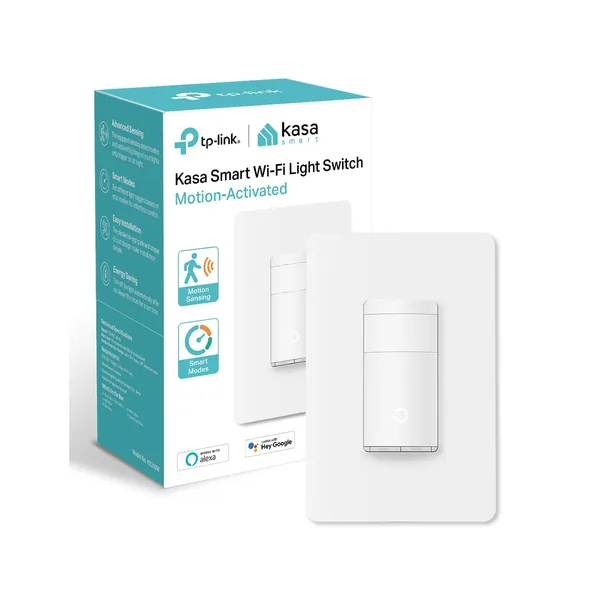
Kasa KS200M Motion Sensor Switch
Wi-Fi switch with app scheduling. Needs a neutral wire, so check your box first.
Check price on AmazonFree: Home Energy Audit Checklist (PDF)
A two-page, room-by-room checklist for finding air leaks, standby power and heating and cooling waste yourself, in the order that pays back fastest. Get it now, plus new fix guides by email. Unsubscribe any time.
By signing up you agree to receive emails from EcoHome Intelligence. See our Privacy Policy.
Frequently Asked Questions
How do you wire a 3-wire motion sensor switch?
Supply hot to LINE, the wire to the light to LOAD, and bare copper to GROUND, with the breaker off. This works only for models that need no neutral, such as the Lutron Maestro MS-OPS2 or Leviton IPS02.
Does a motion sensor switch need a neutral wire?
It depends on the model. Lutron Maestro MS-OPS2 and Leviton IPS02 and ODS10 need a ground but no neutral. TOPGREENER TSOS5, Enerlites MWOS and Kasa KS200M require a neutral.
What is the difference between occupancy and vacancy sensors?
An occupancy sensor turns lights on automatically when you enter and off after you leave. A vacancy sensor requires you to switch the light on, then turns it off automatically.
Can I use a motion sensor switch on a 3-way circuit?
Only with a model designed for it, such as the Lutron MS-OPS5M. Single-pole models like the MS-OPS2 cannot be used on 3-way circuits.
How much energy do motion sensor switches save?
The Department of Energy says 10% to 90% of lighting energy depending on how the room is used. They save most in rooms used intermittently, like bathrooms, closets and laundry rooms.
Is there always a neutral in the switch box?
In newer homes usually yes; the 2011 National Electrical Code began requiring a neutral at most switch locations. Older homes often lack one.
Related Guides
- LED vs incandescent cost — what the light itself costs to run
- Motion sensors vs smart bulbs — which to choose
- Energy-efficient lighting — the wider lighting plan
- Home energy audit checklist — a two-page printable
Sources
- Lutron: Installing a Maestro occupancy/vacancy sensor
- Lutron MS-OPS2 specifications (Gexpro)
- Lutron: Occupancy sensor application guide (PDF)
- Leviton ODS10-IDT installation instructions (PDF)
- TOPGREENER TSOS5 installation manual
- Enerlites MWOS installation manual (PDF)
- TP-Link Kasa KS200M product page
- U.S. Department of Energy: Wireless occupancy sensor guide (PDF)
- U.S. Department of Energy: Lighting controls
- Wisconsin DSPS: 2011 NEC requirements FAQ (PDF)
- ESFI: DIY electrical safety
- Fine Homebuilding: Make sure the power is off
- CPSC: Repairing aluminum wiring (PDF)
